Simulation and Robotics 101#
This document covers some general concepts on simulation/robotics that can enable you to work with ManiSkill at a deeper and more technical level (e.g. what is a Pose, how are quaternions used, what are actors and articulations etc.)
General Terms / Conventions#
Pose: A combination of position and orientation which defines where an object is in 3D space. In ManiSkill/SAPIEN, Pose is composed of 3D position and 4D quaternion.
Quaternion: A type of representation of rotation/orientation that is commonly used in simulation defined by 4 values. ManiSkill/SAPIEN uses the wxyz format for Quaternions. To learn more about rotation representation in simulation, you can check out this blog post
Z-axis is “up”: ManiSkill/SAPIEN treat the Z-dimension as the canonical “up” direction. So an object like a tall bottle that is positioned up-right will have its long-side along the Z-axis.
Simulated Objects#
For rigid-body simulation, the simulation of objects that cannot deform (like wood blocks, computers, walls etc.), ManiSkill/SAPIEN has two general classes of objects, Actors and Articulations.
In the lifecycle of simulation, we always start with a reconfiguration step, where everything is first loaded into the simulation. After reconfiguration, we then set the pose of all objects and initialize them.
Actors#
Actors are generally “singular” objects that when physically acted upon with some force (like a robot) the entire object moves together without any deformation. An actor could be a baseball bat, a glass cup, a wall etc. An actor has the following properties:
pose: Where the actor is in 3D space. 3D position is in meters.
linear velocity: The translational velocity (meters/second) of the actor in x, y, and z axes
angular velocity: The angular velocity (radians/second) of the actor in the x, y, and z rotation axes
In simulation actors are composed of two major elements, collision shapes and visual shapes.
Collision Shapes:
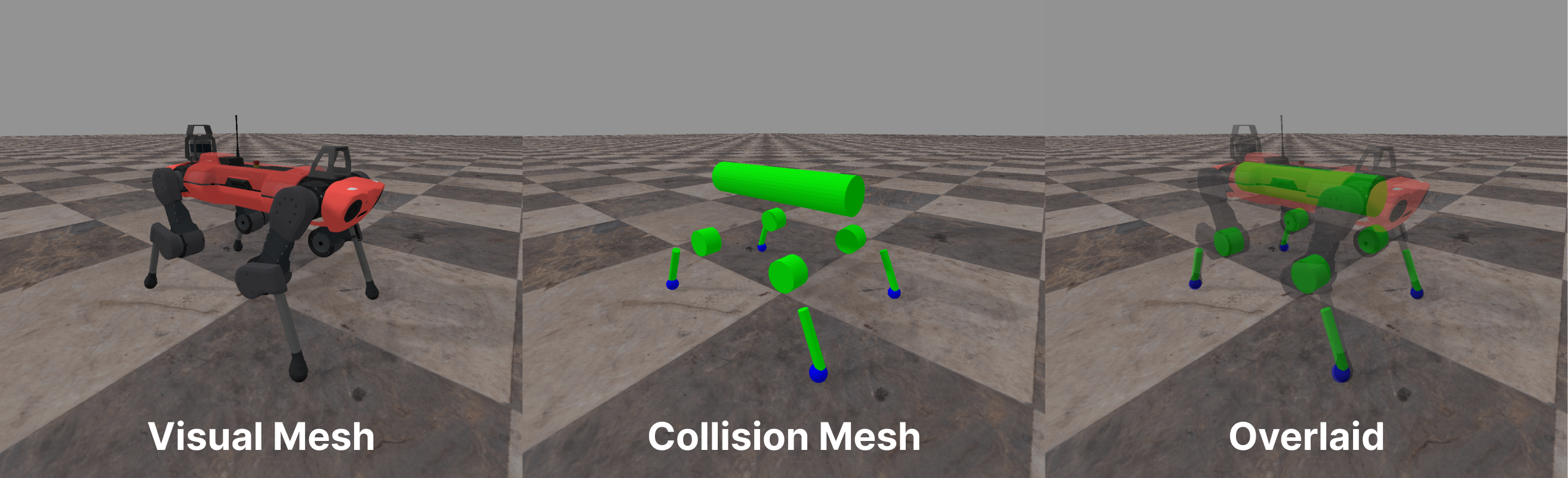
Collision shapes define how an object will behave in simulation. A single actor can also be composed of several convex collision shapes in simulation.
Note that actors do not need to have any collision shapes at all, they could be “ghost” objects that simply float or are there just for visual guides.
Visual Shapes
Visual shapes define how an object is rendered in simulation and has no bearing on physical simulation.
A visualization of the difference between visual and collision shapes can be seen with the quadruped robot below, they don’t have to necessarily align!
Actor Types: Dynamic, Kinematic, Static#
Actors has 3 different types.
Dynamic: These actors are fully physically simulated, if any force is placed on this actor, it will react accordingly as it would in the real world.
Kinematic: These actors are partially physically simulated. If any force is placed on this actor, it will not deform or move a single centimeter. However, dynamic objects that interact with this actor will receive reactionary forces. Compared to dynamic objects however kinematic objects use less cpu/gpu memory and are faster to simulate
Static: These are the exact same as Kinematic actors, but use less cpu/gpu memory and are faster to simulate at the cost of being unable to change their pose after being loaded into the simulation.
Objects like walls, floors, cabinets are often built as kinematic/static actors since in real life you generally aren’t going to be able to move/destroy them.
Depending on the task you want to simulate, you will want to make certain objects dynamic. For a task where you want to simulate picking up a cup and moving it to a shelf, the cup itself would be dynamic, and the shelf might be made kinematic/static.
Articulations#
Articulations are composed of Links and Joints. In ManiSkill/SAPIEN any two links are connected by a single joint. They can often be defined by an XML / tree representation to define more complex articulation structures. Examples of articulations include cabinets, fridges, cars, pretty much anything that has joints.
We first describe a bit more about what links and joints are below:
Links#
Links behave just like Actors in that they have the same properties and can be physically simulated and manipulated, with the only difference being that Links are constrained to be connected to another link by a given joint.
Like Actors, Links have collision shapes, visual shapes, pose, velocities etc.
Joints#
Generally there are three kinds of joints, fixed, revolute, and prismatic.
Fixed joints are joints that connect two links and fix their relative positions in place. This is more of for convenience in defining articulations since the two links connected by a fixed joint can actually be merged into one usually.
Revolute joints are joints that behave like hinges, where the two connected links can revolve around the axis of that revolute joint.
Prismatic joints are joints that behave like sliders, where two connected links can shift along a single direction on a plane.
Example#
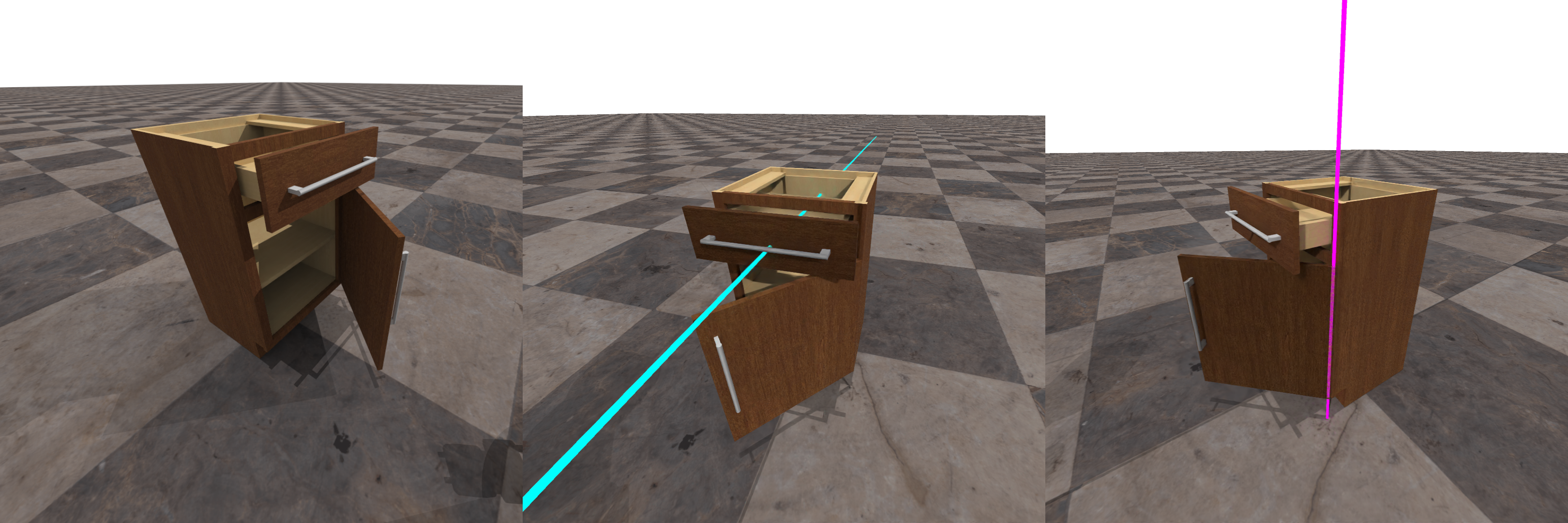
An example of an articulation would be a cabinet as shown below. The cabinet below has a base link which is the entire cabinet itself, a link for the top drawer, and a link for the bottom door.
The joint connecting the top drawer with the base is a prismatic joint and you can see the direction in light blue of that joint. The joint connecting the bottom door with the base is a revolute joint and you can see the axis of rotation in purple.